Updated: August 12, 2026.
There is a popular guide on hooking OpenCode Go into Claude Code that gives you six export commands. They work. Until you reboot. Then Claude Code forgets everything and you are back to typing the same exports by hand. The fix takes two minutes and you do it once.
The guide itself is correct, but there is a catch most people miss. OpenCode Go gives you 18 models for $10/month ($5 for the first month), but Claude Code only speaks the Anthropic protocol. That means only the models with Anthropic-compatible endpoints work. As of August 2026 there are six: MiniMax M3, MiniMax M2.7, Qwen3.8 Max, Qwen3.7 Max, Qwen3.7 Plus, and Qwen3.6 Plus. DeepSeek V4, GLM, Kimi, Grok 4.5, and GPT 5.6 Luna use OpenAI-compatible endpoints and will not work with Claude Code no matter what you put in the config. Six models out of eighteen. Still a good deal, but now you know.
The setup: point ANTHROPIC_BASE_URL at the OpenCode Go endpoint, set ANTHROPIC_AUTH_TOKEN, pick from the three Anthropic-compatible models, and Claude Code routes all requests through the Go subscription instead of billing your Anthropic account. The problem is not the setup. The problem is that export commands die with the terminal.
TL;DR: paste this and you are done
Create ~/.claude/settings.json with your OpenCode Go key:
{
  "env": {
    "ANTHROPIC_BASE_URL": "https://opencode.ai/zen/go/",
    "ANTHROPIC_AUTH_TOKEN": "",
    "ANTHROPIC_API_KEY": "sk-your-opencode-go-key",
    "ANTHROPIC_DEFAULT_OPUS_MODEL": "minimax-m3",
    "ANTHROPIC_DEFAULT_SONNET_MODEL": "minimax-m3",
    "ANTHROPIC_DEFAULT_HAIKU_MODEL": "minimax-m3",
    "CLAUDE_CODE_SUBAGENT_MODEL": "minimax-m3"
  }
}
Replace sk-your-opencode-go-key with your actual key from the OpenCode Zen console. That is the whole fix. Claude Code reads this file at startup and it survives reboots. If you want to understand why this works and what the other options are, keep reading.
Why the exports vanish
When you run export in a terminal, the variable lives in that shell process and its children. Close the terminal, the process dies, the variable is gone. Reboot the machine, same thing. This is not a Claude Code limitation. Every environment variable set this way is ephemeral by design. The fix is to store the configuration somewhere that gets read every time you launch Claude Code. You have two good options and one niche one.
Option 1: Shell profile (the universal approach)
Add the exports to your shell's startup file. Which file depends on your shell. Bash users edit ~/.bashrc. Zsh users edit ~/.zshrc. If you are unsure, run echo $SHELL to check.
Open the file and append the exports, replacing the placeholder with your actual key from the OpenCode Zen console:
export ANTHROPIC_BASE_URL="https://opencode.ai/zen/go/"
export ANTHROPIC_AUTH_TOKEN=""
export ANTHROPIC_API_KEY="sk-your-opencode-go-key"
export ANTHROPIC_DEFAULT_OPUS_MODEL="minimax-m3"
export ANTHROPIC_DEFAULT_SONNET_MODEL="minimax-m3"
export ANTHROPIC_DEFAULT_HAIKU_MODEL="minimax-m3"
export CLAUDE_CODE_SUBAGENT_MODEL="minimax-m3"
Save the file, then either open a new terminal or run source ~/.bashrc (or source ~/.zshrc) to load the changes immediately. Every new terminal session now loads these variables, and Claude Code picks them up at launch.
This works. The downside is that these variables become visible to every process on your system, not just Claude Code. For most people this does not matter. If you are on a shared machine or prefer cleaner separation, use Option 2.
Option 2: settings.json env block (Claude-native, recommended)
Claude Code reads a JSON configuration file at startup. You can put environment variables inside it under an "env" key. This is cleaner because the variables only affect Claude Code, and you can scope the file per project.
Create or edit ~/.claude/settings.json:
{
  "env": {
    "ANTHROPIC_BASE_URL": "https://opencode.ai/zen/go/",
    "ANTHROPIC_AUTH_TOKEN": "",
    "ANTHROPIC_API_KEY": "sk-your-opencode-go-key",
    "ANTHROPIC_DEFAULT_OPUS_MODEL": "minimax-m3",
    "ANTHROPIC_DEFAULT_SONNET_MODEL": "minimax-m3",
    "ANTHROPIC_DEFAULT_HAIKU_MODEL": "minimax-m3",
    "CLAUDE_CODE_SUBAGENT_MODEL": "minimax-m3"
  }
}
That is it. No shell editing, no source command, no exports. Claude Code reads this file every time it starts and applies the env values automatically. Reboot the machine, launch claude, and it still works. The official Claude Code docs confirm that the env key inside settings.json is the canonical way to set persistent environment variables.
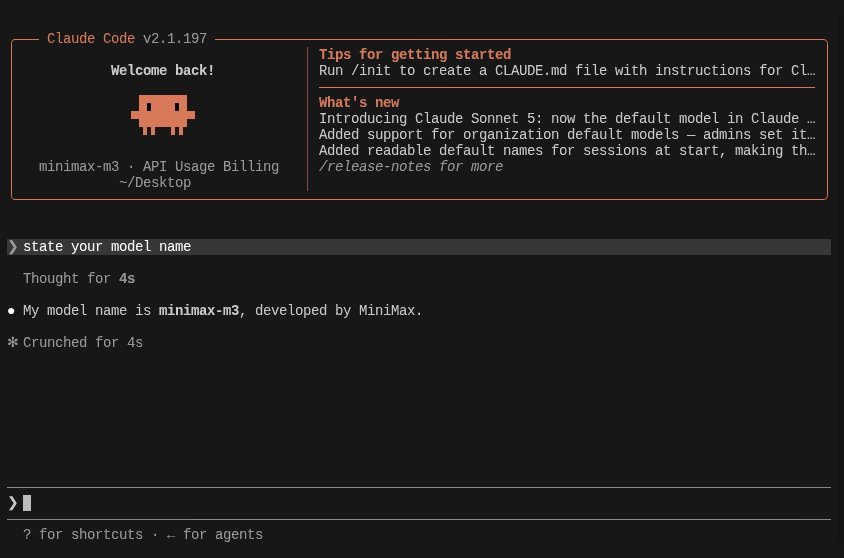
If you want these settings to apply only to a specific project, use .claude/settings.local.json inside the project root instead. Add that file to .gitignore so you do not commit your API key. Claude Code supports four config scopes: ~/.claude/settings.json for you globally, .claude/settings.json for everyone on the project (committed), .claude/settings.local.json for you in one project (not committed), and managed settings for organizations. The env key works in all of them.
A small but important detail: the env block is read at Claude Code startup, not at shell startup. If you change the file while Claude Code is running, the new values do not take effect until you restart it. Same behavior as shell exports.
Which models to pick
The common recommendation is minimax-m3 for all four model slots. That works, but you do not have to use the same model everywhere. Claude Code distinguishes between Opus-class (heavy reasoning), Sonnet-class (default), Haiku-class (lightweight background tasks), and subagent models. You can mix them.
Check the OpenCode Go endpoint table. Look for Anthropic in the AI SDK PACKAGE column. As of August 2026 there are six, and their monthly request budgets differ by more than an order of magnitude:
| Model | Requests per month | Best slot |
|---|---|---|
| Qwen3.7 Plus | 21,600 | Haiku, subagents |
| MiniMax M3 | 16,000 | Sonnet, Opus |
| Qwen3.6 Plus | 16,300 | Haiku, subagents |
| MiniMax M2.7 | 17,000 | Sonnet |
| Qwen3.7 Max | 1,690 | occasional heavy work |
| Qwen3.8 Max | 810 | occasional heavy work |
The OpenAI-compatible models (GLM, Kimi, DeepSeek, Grok 4.5, GPT 5.6 Luna) do not work with Claude Code because Claude Code speaks the Anthropic protocol.
MiniMax M3 is the strongest all-rounder among the Anthropic-compatible set. An independent review reports that MiniMax M2.5 scored 80.2 percent on SWE-Bench Verified, close to Claude Opus 4.6 at 80.8 percent. M3 is the newer iteration. For Sonnet and Opus slots, it is the safe pick. Qwen3.7 Plus is cheaper per token and faster, making it better for the Haiku and subagent slots where you want speed over depth. Note the Max variants: Qwen3.8 Max gives you only 810 requests per month, so do not wire it into a slot Claude Code hits constantly.
Option 3: CLAUDE_ENV_FILE (niche, for project environments)
Claude Code has a CLAUDE_ENV_FILE variable that points to a shell script. Claude Code sources this script before every bash command it runs. This is documented in the Claude Code settings reference and was clarified in a GitHub issue about non-persistent env vars.
Do not use CLAUDE_ENV_FILE to set ANTHROPIC_BASE_URL or ANTHROPIC_API_KEY. Those need to be present when Claude Code itself starts, not just when it runs bash commands. Use settings.json for provider configuration. Use CLAUDE_ENV_FILE for things Claude Code's bash tool needs inside your project: activating a Python virtualenv, setting PYTHONPATH, loading conda environments.
A real example: you have a Python project that needs a specific virtualenv activated before Claude Code can run tests. Create a file at ~/env-setup.sh with source /path/to/venv/bin/activate, then launch Claude Code with CLAUDE_ENV_FILE=~/env-setup.sh claude. Claude Code sources that script before each bash call, so pytest and python pick up the right environment. This is the kind of thing that would also benefit from being permanent, and CLAUDE_ENV_FILE gives you that without polluting your global shell profile.
Which approach should you use
For the provider configuration (base URL, API key, model selection), use Option 2 with settings.json. It is the Claude-native way, it survives reboots, and it does not leak API keys into every process on your machine. If you also want the convenience of running claude from any terminal without thinking about it, put a single line in your shell profile: export CLAUDE_ENV_FILE=~/env-setup.sh if you need project-specific environment setup, or nothing at all if settings.json covers everything.
For project-specific environment needs that Claude Code's bash tool requires, use CLAUDE_ENV_FILE. These two approaches compose cleanly: settings.json handles Claude Code's own configuration, CLAUDE_ENV_FILE handles the project environment that Claude Code operates in.
What you actually gain
After making the config permanent, Claude Code routes all API calls through OpenCode Go without you thinking about it. You get access to 13 models behind a single $10 subscription. OpenCode Go gives you $60 of monthly usage credit, which translates to roughly 16,000 requests per month with MiniMax M3 or 21,600 with Qwen 3.7 Plus, based on OpenCode's published estimates.
The limits have a three-layer structure: $12 per rolling 5-hour window, $30 per week, $60 per month. For part-time use, hobby projects, or as a secondary tool alongside a Claude Pro subscription, these limits are generous. For all-day professional coding, you will hit the caps. OpenCode themselves position Go as a companion tier, not a replacement for direct API access.
The real win is flexibility. You can switch between Claude Code, the OpenCode TUI, Codex, or any other Anthropic-compatible client using the same OpenCode Go key. The subscription is not locked to one tool. This is why the settings.json approach beats shell exports: it keeps your Claude Code configuration isolated and portable, and it is one file you can back up or symlink across machines.
The core insight of that original guide stands: you can use OpenCode Go's Anthropic-compatible endpoint to replace Claude Code's default API target. This lets you experiment with Claude Code's agentic features without paying Anthropic's per-token rates. The MiniMax and Qwen models are not Opus-level, but they are good enough for scaffolding, tests, refactoring, and CRUD work. Save Claude Opus for architectural decisions and hard debugging, and let the $10 subscription handle everything else.
Just make the config stick.
FAQ
Can I use OpenCode Go in Claude Code?
Yes. OpenCode Go exposes an Anthropic-compatible endpoint, so Claude Code can route through it by setting ANTHROPIC_BASE_URL to https://opencode.ai/zen/go/ and supplying your OpenCode Go key. The catch is that only six of the eighteen models speak the Anthropic protocol, so DeepSeek, GLM, Kimi, Grok, and GPT models are unavailable to Claude Code regardless of your config.
How do I use OpenCode Go with Claude Code permanently?
Put the configuration in ~/.claude/settings.json under an env key instead of exporting it in your shell. Claude Code reads that file at every startup, so the setup survives reboots and new terminal sessions. Shell exports live only in the process that ran them, which is why setups from most guides stop working after you restart.
What is the correct ANTHROPIC_BASE_URL for OpenCode Go?
The base URL is https://opencode.ai/zen/go/, including the trailing slash. Pair it with ANTHROPIC_API_KEY set to your key from the OpenCode Zen console and leave ANTHROPIC_AUTH_TOKEN empty. Claude Code reads all three at startup.
Which OpenCode Go models work with Claude Code?
Six models carry Anthropic-compatible endpoints: MiniMax M3, MiniMax M2.7, Qwen3.8 Max, Qwen3.7 Max, Qwen3.7 Plus, and Qwen3.6 Plus. MiniMax M3 is the best default for the Sonnet and Opus slots at 16,000 requests per month, while Qwen3.7 Plus suits the Haiku and subagent slots at 21,600. Avoid the Max variants for high-frequency slots because they cap under 2,000 requests per month.
Does OpenCode Go replace a Claude subscription?
Not for full-time professional work. The limits are $12 per rolling 5-hour window, $30 per week, and $60 per month, which is generous for hobby projects and part-time use but reachable in a day of heavy agentic coding. OpenCode positions Go as a companion tier, and the practical setup is Go for scaffolding, tests, and refactoring with a direct Claude subscription reserved for architecture and hard debugging.